This guide is for Amazon sellers who want to buy branded products in bulk and sell them through Fulfillment by Amazon (FBA). It covers the types of Amazon FBA wholesale suppliers, the paperwork you need before you contact them, how to check a supplier before you pay, and what to work out before your first order.
This page replaces our older supplier list. We now name only suppliers that are live listings in the Suppliers Central directory, and we link to their listing so you can check the details yourself.
What kind of supplier do you need?
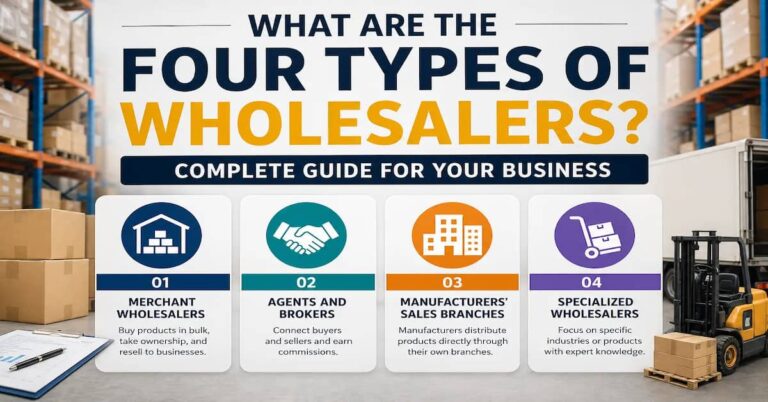
“Wholesale supplier” covers several kinds of business. For Amazon, the difference matters because the paperwork you get from each one is not equally useful if Amazon asks where your stock came from.
| Supplier type | What they are | What to expect |
|---|---|---|
| Brand owner or manufacturer | The company that makes or owns the product | Best price and the clearest paper trail, but often higher minimum orders and an application process |
| Authorized distributor | A company the brand has approved to resell its products | Lower minimums than the brand, many brands in one account; ask for proof they are authorized |
| General wholesaler or closeout seller | Buys stock from several sources, including overstock | Good prices and variety, but the chain back to the brand may be unclear |
| Liquidator | Sells returns and overstock by the case or pallet | Lowest cost, mixed condition; returned items usually can’t be listed as New |
Get your paperwork ready first
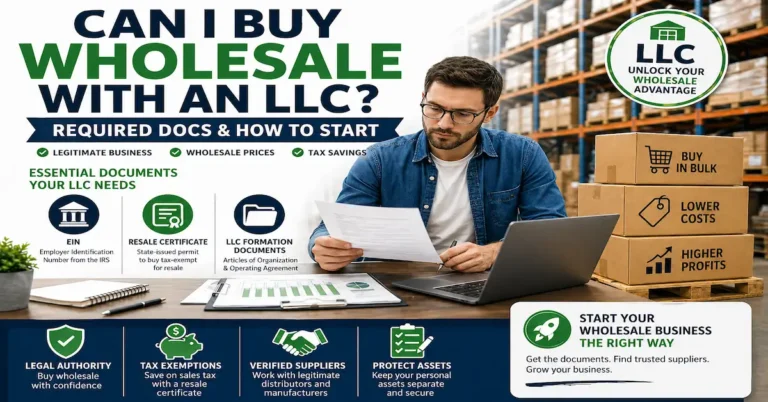
Most real wholesalers sell only to businesses and will ask for proof before they open an account. Have these ready:
- A registered business in your state, with an Employer Identification Number (EIN) from the IRS.
- A resale certificate or seller’s permit from your state, so you can buy for resale without paying sales tax on the purchase. Each state names and issues these differently.
- A business email address and a simple website or storefront link. Suppliers use these to judge whether you are a real business.
- An Amazon selling plan. Amazon’s pricing page lists the Professional plan at $39.99 a month, alongside referral fees and FBA fees that vary by category and product size.
Where to find Amazon FBA wholesale suppliers
- Brand websites. Look for a “Wholesale”, “Become a retailer” or “Where to buy” page. If there isn’t one, email the brand and ask for its list of authorized distributors.
- Product packaging. The “Distributed by” line on a box often names the distributor.
- Trade shows. Meeting suppliers in person lets you see stock and ask about terms directly.
- Wholesale directories. Our Amazon FBA Suppliers category groups listings from suppliers that sell to Amazon sellers.
Examples from our Amazon FBA category
These listings are in no particular order. A listing is a starting point for your own checks, not a guarantee.
| Listing | What the listing describes |
|---|---|
| Catalist Group | A sourcing platform for Amazon FBA and Walmart WFS sellers |
| Coral Port Distribution | Branded-product distribution for Amazon FBA and e-commerce sellers |
| Cotton Valley | Household goods and general merchandise from New Jersey |
| Fox Outdoor Products | Outdoor, camping and military-style gear |
| Ecom Prep’n Pack | A prep and fulfillment service in California, for labeling and packing before stock goes to Amazon |
How to check a supplier before you pay
- Look up the company registration. Search the business name on the Secretary of State website for the state where it says it is based.
- Check the address. Look at it on a map and in street view. A warehouse or office is a better sign than a house or a mailbox service.
- Call the phone number. A real business answers with its name and can tell you its terms.
- Ask for a sample invoice. It should show the supplier’s legal name, address and phone number, your business name and address as they appear in your Seller Central account, product descriptions, quantities and the date.
- Ask whether they are authorized for the brands you want, and whether they can provide a letter of authorization if a brand asks for one.
- Be careful with payment. Be wary of a new supplier that accepts only payment methods you cannot trace or dispute.
- Place a small test order and check the condition, packaging and delivery time before you order more.
What to work out before your first order
- Can you sell it? Search the product in Seller Central. Some categories and brands need approval first, and Amazon sets the requirements for each.
- Who else is on the listing? If Amazon or the brand sells the product itself, winning the Buy Box is hard. Check the price history with a tool such as Keepa.
- Does the brand complain about resellers? Ask the supplier, and search seller forums for the brand name plus “IP complaint”.
- What is the real cost? Add the unit price, shipping to you or your prep center, prep and labeling, shipping to Amazon, the referral fee and the FBA fee. Compare that total with the price the product actually sells for.
- What is the minimum order? Ask about the minimum order quantity (MOQ) and whether it is per item, per case or per order.
Prep and shipping to Amazon
Amazon needs every unit labeled and packed to its prep rules. You can do this yourself, pay a prep center, or ask whether the supplier will label units with your FNSKU barcodes and ship straight to Amazon. If a supplier offers this, confirm the cost and who pays if Amazon rejects a box.
Common mistakes
- Buying hundreds of units of a product you have never sold. Start with a quantity you can sell within a few weeks.
- Using retail receipts or pro forma invoices as proof of purchase.
- Choosing a supplier on price alone. A price far below every other source is a reason to ask more questions.
- Sending one-line emails. Introduce your business, name the brands you want, and mention your resale certificate.
Checklist
- Register your business, get an EIN and a resale certificate.
- Pick one category to start.
- Build a shortlist of 5 to 10 suppliers from brand sites, packaging, trade shows and directories.
- Check each one using the steps above.
- Confirm you can sell the products, and work out the full cost per unit.
- Place a small test order, then reorder what sells.